Description
With the aggregator pattern, a set of messages can be automatically collected and combined into a single aggregation result. The aggregator implementation collects messages until a specified situation (e.g. message number over limit, periodically timer) occurs. In case of that, all messages are combined and the result is used for the further processing.
Create
-
Create a process model
-
Open the panel named process, per default this panel is on the right side of the Orchestra designer window.
-
Click on the folder activities to see its content.
-
Click on "Aggregator" and drag it to any place in your process model.
Icon

Configuration
Label and Non functional properties
See at common configurations for activities.
Aggregation
In this tab all settings how aggregation works are done.
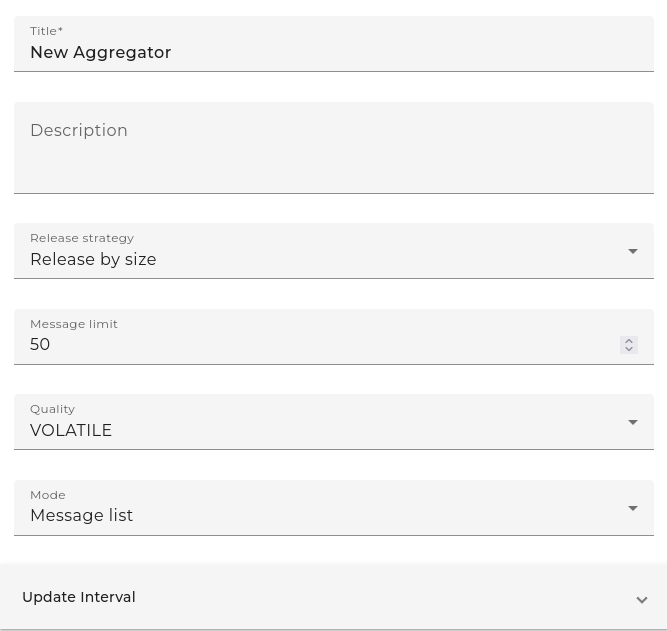
The section delivery defines the point in time when the result of the aggregate will be delivered to orchestra for further processing.
| Field | Description |
|---|---|
| Release strategy | Defines the strategy when the aggregation result will be delivered to orchestra: Release by size: When the number of arrived messages reaches a limit, the result will be released. Release by time: The result of the aggregate will be released periodically, depending on a timer setting. User defined: The result of the aggregate will be released upon a command of the user. |
| Message limit | Only available if the release strategy Number of messages is used. The aggregate collects up to this number of messages before it is released. |
| Time-controlled | Only available if the release strategy Timer based is used. The result of the aggregate is released periodically based on this timer setting. |
| Quality of service | Defines how the aggregation data are stored temporarily: Volatile: The aggregated messages are stored in memory. Durable: The aggregated messages are stored permanently. |
The section aggregation strategy defines the way how the collected messages are combined to the aggregation result
| Field | Description |
|---|---|
| Mode | Defines the strategy for how the set of messages is combined into the result: Message list: All collected messages are returned in a message list. Combined message: All collected messages are combined into one orchestra message. Aggregated message: The result message is generated by combining the messages with each other. |
| Mapping | Only available if the aggregation mode aggregated message is used. Holds a reference to a message mapping that is used to combine the messages. The referenced mapping needs to have two input parameters of type messages: SRC contains the arrived messages. AGGREGATE contains the result of the previous mapping step. This message is initial if the aggregation starts. |
| Message type | Only available if the aggregation mode "Combined Message" is used. Contains a reference to an orchestra message type. This type is used to obtain the name of the root element of the combined message. If not set, the name soffico:combined is used. |